Mechanical hard drives die in a very specific, very rude way: they slow down first, and you ignore it. A clicking sound. A file transfer that used to take forty seconds now taking three minutes. Then one morning the machine won't boot, and the last backup you actually made was nine months ago. I've watched that happen to two colleagues in the same year, and neither of them lost the drive — they lost the archive, which happened to live on that drive alone.
That experience is roughly why I stopped asking "which one is faster" and started asking "which one is right for this specific job." Because the honest answer to SSD vs HDD: which storage drive is best for your needs is that neither wins outright. They fail differently. They cost differently. And the configuration that has served me best for years is not a choice between them at all.
Key Takeaways
- An SSD has no moving parts, so it's silent, shock-resistant and roughly an order of magnitude faster on random reads — that's what makes a computer feel fast.
- Cost per terabyte still favours the spinning disk by a wide margin, and that gap is the only reason HDDs are still in the conversation.
- Lifespan is a wash in practice: an SSD wears out by write cycles, an HDD by mechanical failure, and both usually outlive the machine they're installed in.
- External drives are the one place where the difference is genuinely dramatic — and the one place where cheap HDDs get dropped.
- The hybrid setup (SSD for the system, HDD for bulk data) remains, in my opinion, the best value for anyone working with large files.
SSD vs HDD: the real difference, explained without the marketing
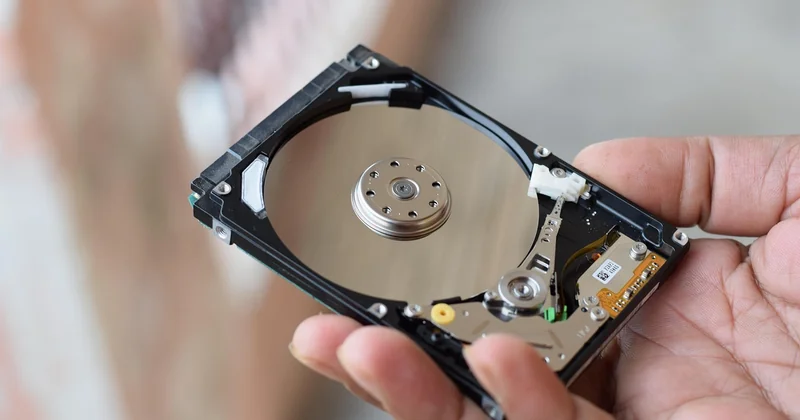
Inside a hard disk drive there's a stack of magnetised platters spinning at 5,400 or 7,200 revolutions per minute, with a read/write head floating a few nanometres above the surface on a cushion of air. To read a file, the head has to physically travel to the right track and wait for the right sector to rotate underneath it. That travel and that wait are called seek time and rotational latency, and together they're measured in milliseconds.
A solid-state drive has none of that. It's flash memory cells, addressed electrically, with no arm to move. Response time drops to microseconds.
Which sounds like a spec-sheet detail until you understand what it changes. Most everyday computing isn't one big sequential read — it's thousands of tiny random reads: the operating system pulling system files, the browser hitting its cache, a game loading textures from scattered locations. An HDD handles those at roughly 75 to 150 random IOPS. A decent SATA SSD handles tens of thousands. That ratio, not the headline sequential speed, is why an old laptop with an SSD feels newer than a newer laptop with an HDD.
What "sequential" and "random" speed actually mean
Sequential speed is copying one large file — a 4 GB video export, say. Random speed is opening an application, booting the system, loading a level. Vendors love quoting the first number because it's bigger and cleaner. Your daily experience is governed by the second.
- Boot time: an SSD typically cuts it to a fraction of the HDD figure — a difference you notice every single morning
- Application launch: the gap is smaller because launch time depends heavily on the processor and RAM too
- Large file transfers: the two technologies get much closer, because here the HDD is doing what it's actually good at
Here's the thing most comparisons skip: sequential throughput is where mechanical drives claw back respectability. Copying a folder of photos or a video project, a good 7,200 RPM drive can hold its own. It's the small, scattered, constant access that kills it.
Why the "feel" of speed isn't about throughput
I upgraded an older desktop from a 7,200 RPM drive to a mid-range SATA SSD. The processor was unchanged. The RAM was unchanged. Boot went from over a minute to somewhere around fifteen seconds, and — more telling — the machine stopped freezing while I worked. That freezing was the drive queue saturating. No benchmark chart shows "the computer stops stuttering," but it's the real reason people describe SSDs as transformative.
Cost per terabyte: the number that decides most purchases
Cost is where the HDD argues its case, and it argues it well. Roughly speaking, the spinning disk costs a small fraction per gigabyte compared to flash, and that ratio has held stubbornly for years. Flash has gotten cheaper, but so have platters.

What this means practically: at the low end, an SSD is clearly the right call because the capacity is small and the speed gain is enormous. At the high end — say, an 8 TB archive — the SSD premium becomes genuinely painful, and the HDD suddenly looks like a rational adult choice rather than a compromise.
| Scenario | Better pick | Why |
|---|---|---|
| Operating system drive | SSD | Every file the system touches lives here; random speed is everything |
| Video editing scratch disk | SSD | Constant read/write while scrubbing a timeline |
| Media archive, 4 TB+ | HDD | Written once, read occasionally; cost per TB dominates |
| Portable external drive you carry daily | SSD | No moving parts to survive the drop |
| Desktop drive you never move | HDD | Cheapest bulk capacity, decent sequential speed |
| Network-attached backup target | HDD | Throughput is limited by the network anyway |
The table isn't a rulebook. It's the reasoning I use, and I'd happily break it for a good reason — like a laptop that gets carried in a bag every day, where I'd pay the SSD premium even for a modest capacity.
SSD vs HDD lifespan: which one actually dies first
Both technologies die, and they die for completely different reasons. Understanding the mechanism tells you which risk you're actually taking.
How an SSD wears out
Flash cells tolerate a finite number of write-erase cycles. Consumer drives rate this as TBW — terabytes written — and good ones publish the figure. A 1 TB drive rated for several hundred TBW, used by someone who writes maybe 10 GB a day, has a theoretical life measured in decades. That said, most people never approach the rating, because the drive controller spreads writes across cells to even out the wear.
The failure mode you should worry about more: sudden controller death. The drive is working, then it isn't, and unlike an HDD there's usually no warning sound.
How an HDD wears out
Mechanical drives fail from physical causes — a head crash, a motor bearing, shock damage, or simply years of heat. They often telegraph it: bad sectors, read errors, SMART warnings, that clicking. Occasionally they give you nothing at all.
The honest conclusion is that lifespan is not a deciding factor between the two. In a decade of juggling both, the drives that failed on me were two HDDs, one from a drop and one from old age, and one SSD that died with no warning whatsoever mid-project. The lesson wasn't "buy SSD" or "buy HDD." It was: back up, always, and don't treat either as permanent.
SSD or HDD: which is better for gaming?
SSD, and it isn't close — but not for the reason people assume. Frame rates are usually governed by the graphics card and processor. What the drive changes is loading times and, in modern games that stream assets continuously as you move through the world, texture pop-in and stutter.
Open-world titles are the clearest case. On an HDD, fast travel can mean a loading screen long enough to make tea, and entering a dense area can hitch as the drive struggles to feed data fast enough. On an SSD, those hitches largely vanish. Some newer engines also assume flash storage when streaming assets, which makes the gap wider than it used to be.
If you have room for exactly one drive and you game, put the games you play most on the SSD. Keep the rest on the HDD. That's what I do, and the difference between the two categories on my own machine is obvious within a single session.
SSD vs HDD for external storage and reliability
External drives deserve their own section, because the physics change when the device moves.
The drop test
A spinning HDD that's knocked while running can suffer a head crash — the head contacts the platter and takes the data with it. An SSD has nothing to crash. If your external drive lives in a bag, on a desk edge, or in the hands of someone who isn't you, this is the single strongest argument for flash.
Long-term cold storage
Here the argument flips, and it's the part almost nobody mentions. Powered-down flash is not indefinitely stable — cells can lose charge over very long periods, especially in warm conditions. A magnetic platter sitting on a shelf, unpowered, tends to hold its data more patiently over years. For an archive you plug in twice a year, the HDD has a real case.
My setup is neither elegant nor expensive: a portable SSD for anything I'm actively carrying, and two spinning drives in rotation for the archive, one of which lives at a different address. Redundant, not clever.
The configuration I actually recommend
Stop treating this as a binary. The best value for most people working with real data volumes is the hybrid:
- An SSD, sized to fit your operating system, applications and current projects, as the system drive
- A large HDD for photos, video, old projects, and anything written once and read rarely
- An external SSD for the files that travel with you
- An offline backup that isn't connected to anything, because ransomware and accidents don't care how good your hardware is
I've run a variation of this for years. The machine feels fast, capacity never becomes a crisis, and the total spend lands well below an all-flash setup of the same size. The catch is a little more organisation up front — you have to decide where things live. That's a one-evening job, and it's cheaper than the alternative.
Where this breaks down: laptops with a single drive bay, in which case buy the biggest SSD you can justify and stop negotiating with yourself. And genuinely enormous archives, where a single large HDD plus a proper backup is simply the honest answer.
A note on choosing under pressure
The question people actually ask me isn't about IOPS. It's some version of "my laptop is slow and I have fifty dollars." In that situation the answer is almost always an SSD, even a small one, because the bottleneck on an aging machine is rarely the processor — it's the drive.
But if the question is "I have three terabytes of family video and I need it to still exist in fifteen years," the answer is a hard drive, two of them, in two places, and a calendar reminder to check them.
Storage decisions are rarely about which technology is superior. They're about which failure you can live with. An SSD fails suddenly and silently. An HDD fails slowly and noisily. Pick the one whose failure mode you're prepared for — then go make a backup, because you're overdue and you know it.